What It Does
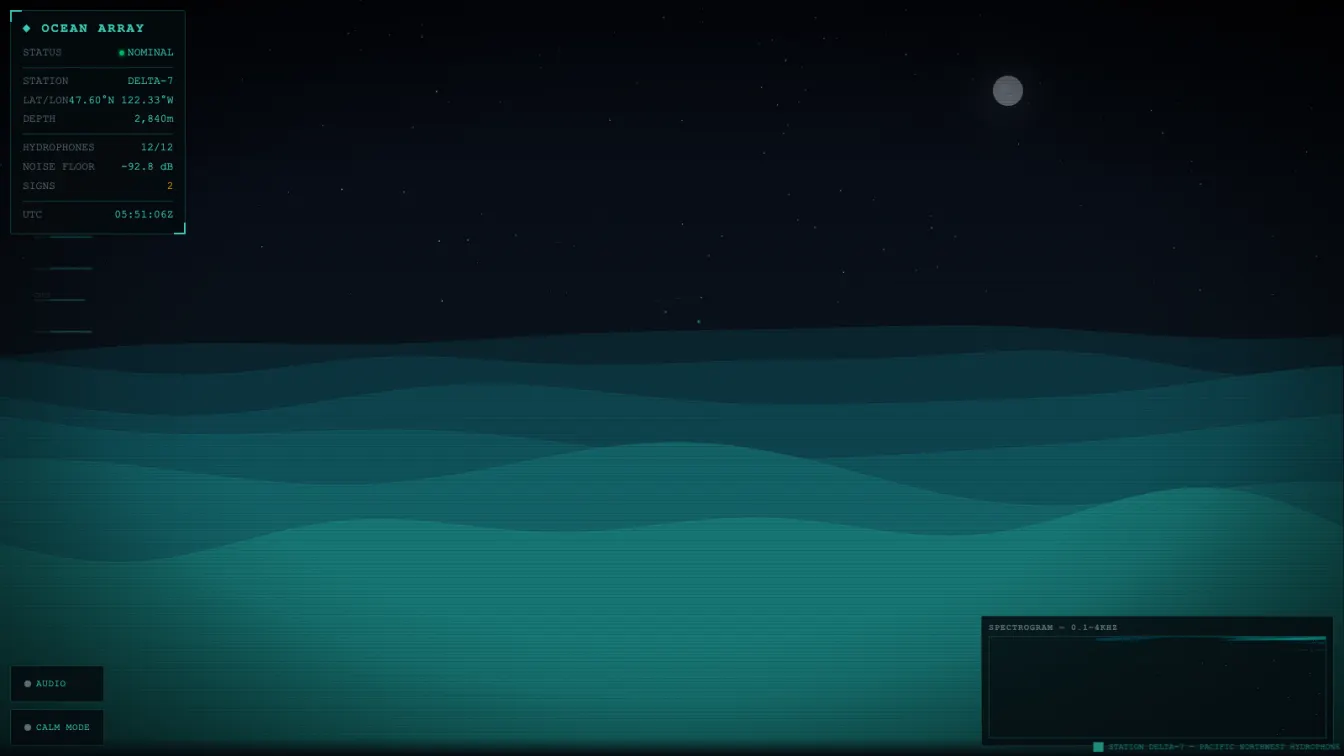
Six layers of procedurally generated ocean waves roll across the screen, driven by superimposed sine waves at different frequencies, amplitudes, and speeds. Each layer moves at a different parallax rate, creating depth. Above the water sits a starfield with twinkling stars and a moon with soft glow, whose reflection shimmers on the water surface.
Three things happen simultaneously:
- The ocean — six sine-wave layers with parallax depth, moon reflection on the water surface, twinkling star field
- The sonar waterfall — a real-time spectrogram showing acoustic density across the 0.1–4kHz band, rendered with
ImageDatapixel manipulation - The hydrophone array sidebar — 12 channel indicators with simulated signal activity and ambient noise levels
The HUD displays station metadata, live noise floor readings, signal counts, and a UTC clock. A scrolling ticker at the bottom provides station context.
Technical Decisions
Sine-Wave Superposition Terrain
Each wave layer is a superposition of 4 sine waves at different frequencies, amplitudes, and phases:
function waveYAtX(x, layer, time) {
  let y = layer.baseY * window.innerHeight;
  for (let j = 0; j < layer.freqs.length; j++) {
    const phase = layer.phases[j] + time * layer.speed + j * 0.5;
    y += Math.sin(x * layer.freqs[j] + phase) * layer.amps[j];
  }
  return y;
}
Six layers with depth-dependent colors (dark muted teal for distant layers, brighter teal for foreground) creates convincing ocean depth. Each layer is rendered as a filled shape from the wave curve down to the bottom edge, then a highlight line traces the surface.
The step size is 3px — enough for smooth curves on any screen while keeping lineTo calls trivial. This avoids p5.js’s noise() function which is 5–10× slower than Math.sin().
ImageData Waterfall vs fillRect
The first implementation used fillRect for each pixel. Visually correct but wrong for a display that updates every frame at 400×120 resolution.
The fix uses createImageData with direct pixel manipulation:
const data = wfImageData.data;
for (let i = 0; i < WF_W * WF_H; i++) {
  const v = wfData[i];
  const idx = i * 4;
  data[idx]     = Math.floor(v * v * 40);    // R
  data[idx + 1] = Math.floor(30 + v * 170);  // G
  data[idx + 2] = Math.floor(50 + v * 120);  // B
  data[idx + 3] = v > 0.08 ? 255 : 0;        // A
}
wfCtx.putImageData(wfImageData, 0, 0);
48,000 pixel writes in one putImageData call. Orders of magnitude faster than 48,000 fillRect invocations.
Web Audio Underwater Soundscape
The audio engine: oscillators → individual gains/filters → master gain → master filter → destination, tuned for underwater acoustics. Five layered drones, whale song synthesis, and two bubble generators. The fade-in is 3 seconds, fade-out is 1.5 seconds — feels like equipment powering on and off gradually.
CRT and Atmosphere via CSS
Scanlines are a repeating-linear-gradient on a separate overlay div. The vignette is a radial-gradient on another div. Neither touches the canvas or the render loop. The canvas renders the ocean, CSS provides the atmosphere.
What I Changed from Previous Builds
Ocean tones (teal, cyan, deep blue-green) instead of radar green. The sonar waterfall replaces the frequency cross-section. And the audio is significantly more complex — three oscillators yesterday, five layered drones plus whale synthesis and bubble generators today.
The calm mode toggle changes the entire atmosphere: brighter sky gradient, larger moon, higher shimmer alpha on the water, thicker wave highlight lines. A small change that makes the scene feel like a different time of day or weather condition.