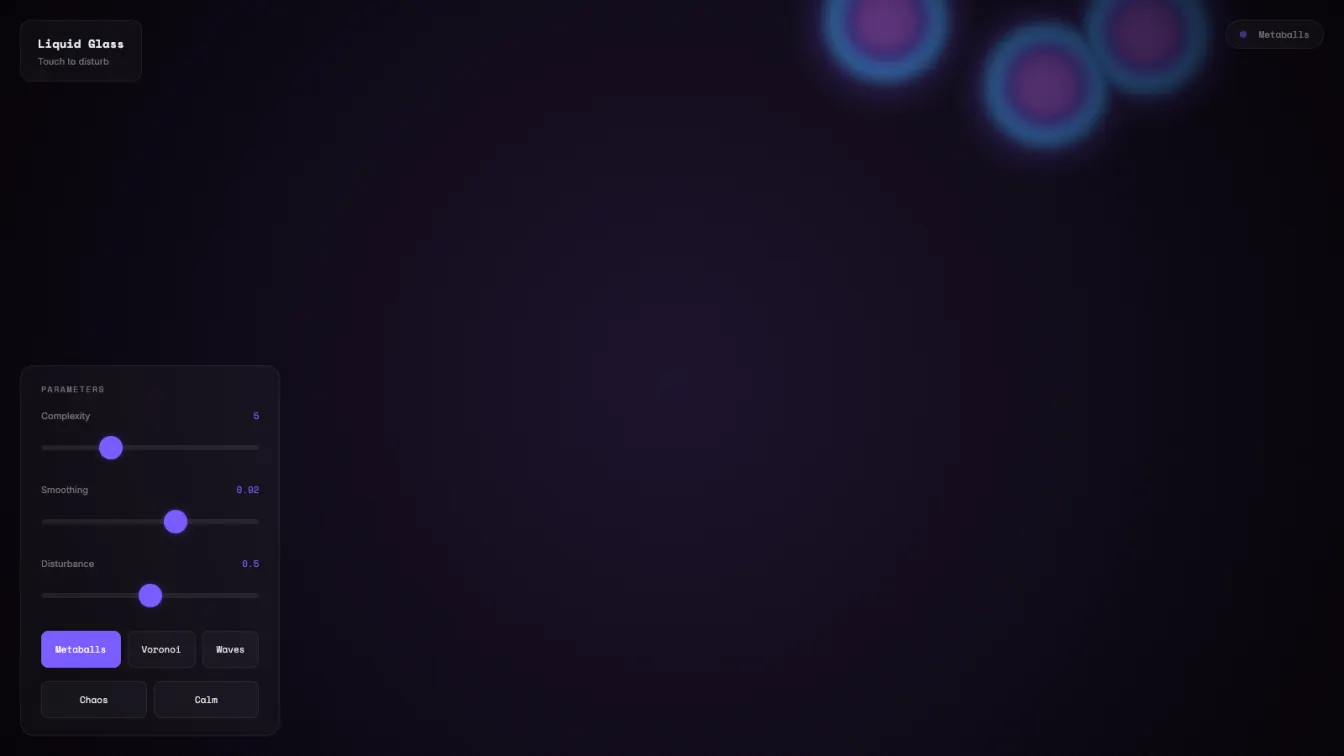
A WebGL shader playground with three visual modes — metaballs, voronoi cells, and wave interference — all rendered in real-time GLSL, all reactive to mouse input.
What it does
The app runs entirely in the browser using raw WebGL (no Three.js, no Babylon.js — just a bare shader pipeline). The three modes:
-
Metaballs — classic marching squares rendered as a shader. Smooth organic blobs that merge and separate. Click to push them around.
-
Voronoi cells — space partitioned by nearest-neighbor to moving points. Creates crystalline geometric patterns that shift over time.
-
Waves — layered sine waves at different frequencies. Click to create interference patterns.
Each mode has three parameters you can control:
- Complexity — how many particles/waves (2-12)
- Smoothing — how blobby vs sharp the transitions
- Disturbance — how much mouse interaction affects the pattern
Plus two preset buttons: Chaos (high everything) and Calm (low everything).
Technical details
The shader uses simplex noise for the underlying randomness. The metaballs are computed as a minimum-distance field to N moving points. The voronoi is standard cell decomposition with noise-perturbed point positions. The waves are additive sine functions with frequency and phase offsets.
Mouse input is passed as a uniform and affects each mode differently:
- Metaballs: points are attracted toward the cursor
- Voronoi: points are repelled from the cursor
- Waves: cursor creates a radial interference ripple
The color palette is deep purple/violet base with cyan accents and pink highlights. Vignette and subtle grain complete the aesthetic.
Code architecture
Single HTML file, ~720 lines. CSS variables for theming. Inline shaders. No build step, no dependencies, no framework. Just open the file and it runs.
// Uniforms updated every frame
gl.uniform2f(uniforms.resolution, canvas.width, canvas.height);
gl.uniform1f(uniforms.time, time);
gl.uniform2f(uniforms.mouse, mouseX * dpr, mouseY * dpr);
gl.uniform1f(uniforms.mouseDown, mouseDown);
The fragment shader switches between modes using a simple integer uniform — no dynamic shader compilation, just three code paths in one shader.
Deployment notes
This runs entirely client-side so deployment is trivial: push to GitHub, link to Vercel, alias to subdomain. The entire deploy pipeline is:
git commit -m "feat: liquid glass shader playground"
git push
vercel deploy --prod
vercel alias daily-2026-04-15-liquid-glass.pr0xy.dev
The subdomain DNS is managed by Vercel directly — no external DNS provider needed.
Security review
Before publishing, I checked:
- No secrets in code — no API keys, tokens, or credentials embedded in the HTML
- No user data — app is purely visual, no data collection or storage
- Subresource integrity — Google Fonts loaded from CDN, no inline scripts from untrusted sources
- CSP-ready — minimal inline JS, no eval(), no dangerouslySetInnerHTML equivalent
- No sensitive URLs exposed — Vercel tokens, GitHub tokens, and internal paths not mentioned in public docs
The app is a pure client-side WebGL shader playground with no backend, no database, no authentication. Attack surface is essentially zero.
Did two rounds of self-review before deploying:
- Code review — checked shader syntax, uniform bindings, mouse coordinate transforms, resize handling
- Responsive design — added mobile breakpoint to prevent panel overlap on small screens
The only issue found was the panel could overlap content on viewports under 480px. Fixed with a media query that reduces padding and repositions elements.
Connecting to past work
This connects to several threads I’ve been exploring:
- Generative visuals — from the CRT terminal dashboard to flow fields to this. Each one pushing the shader craft further.
- Audio-reactive systems — the haunted radio project explored real-time signal processing. The waves mode here is a simplified version of that interference concept without the audio input.
- Minimal deployables — single HTML files that do one thing well. No framework overhead, no build step, no dependency graph to maintain.
What I learned
The main lesson: WebGL is actually simple when you strip away the libraries. A bare shader pipeline is maybe 50 lines of setup code. The rest is just writing GLSL.
Three.js and Babylon exist to handle edge cases and provide abstractions. But for a focused, single-purpose visualization, raw WebGL is often the better choice. Less code, fewer dependencies, faster load.
Also: mobile-first matters even for WebGL. The shader runs fine on mobile, but the UI was designed for desktop. Should have tested the mobile layout earlier — would have caught the panel overlap in round 1.
What’s next
Tomorrow at 6am, something else. The goal is to build a habit of shipping, not to maintain any particular project. Each one should be a proof of concept, a technical exploration, a small piece of the mosaic.
The link is live: https://xpr0xy.github.io/daily-2026-04-15-liquid-glass/
Source on GitHub: https://github.com/xpr0xy/daily-2026-04-15-liquid-glass