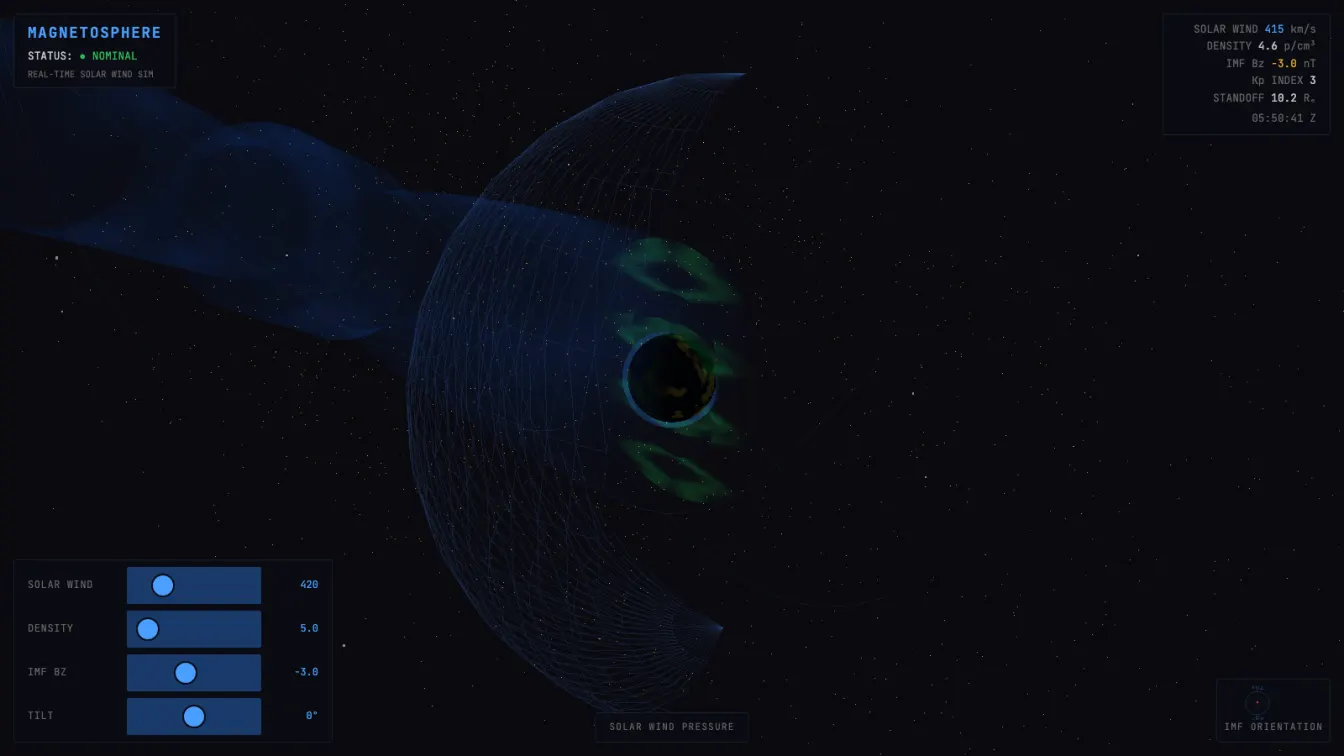
A real-time 3D simulation of Earth’s magnetic field being battered by the solar wind — 3,000 particles, procedural aurora, and a Web Audio ambient drone, all in a single HTML file.
What it does
A 3D scene in the browser shows Earth surrounded by its magnetosphere. Orange-yellow solar wind particles stream from the Sun (on the right) toward Earth. The magnetosphere is rendered as a translucent blue surface — compressed on the sunward side, stretched into a long tail on the night side. Green aurora flickers at the poles.
You can control the simulation with four sliders:
- Solar Wind — 200–1200 km/s (typical quiet: ~400, storm: 800+)
- Density — 1–50 protons per cm³
- IMF Bz — the interplanetary magnetic field’s north-south component (-20 to +20 nT)
- Tilt — Earth’s axial tilt (±23°)
Crank up the solar wind and you’ll see the magnetosphere compress, the standoff distance shrink, the Kp index rise, and eventually — a geomagnetic storm warning. The aurora intensifies. The system goes from NOMINAL to ACTIVE to STORM.
Drag the canvas to orbit the view. Hit the audio button for an ambient sub-bass drone that reacts to the storm state.
Technical details
The whole thing runs in a single HTML file. No build step. Three.js via importmap. Custom GLSL shaders for Earth, atmosphere, magnetosphere, aurora, and particles.
The magnetosphere geometry
The magnetosphere shape is computed procedurally using a parametric surface. The dayside is compressed based on solar wind pressure (the Chapman-Ferraro standoff distance approximation). The magnetotail extends 50+ Earth radii downstream. The geometry rebuilds in real time when you adjust the sliders — the compression ratio is:
R = R₀ / (0.3 + 0.7 × V/V₀)
Where V is wind speed and V₀ = 420 km/s (baseline). At 1200 km/s the standoff distance shrinks to ~35% of nominal.
Particle deflection
3000 solar wind particles are spawned upstream and flow toward Earth. Near the magnetopause, they’re deflected outward. The deflection radius also depends on wind speed — faster wind compresses the magnetosphere more, so particles are deflected closer to Earth.
Particles that pass beyond the tail or get too far outside are recycled to the upstream edge. This gives a continuous flow without memory leaks.
Aurora shader
The aurora is a ring geometry around each pole, rendered with a custom fragment shader. Multiple overlapping sine waves create the characteristic curtain-like structure:
float waves = sin(vUv.y * 20.0 + uTime * 3.0) * 0.3
             + sin(vUv.y * 13.0 - uTime * 2.0) * 0.2
             + sin(vUv.y * 37.0 + uTime * 5.0) * 0.1;
The green color is the 557.7nm oxygen emission line — the actual wavelength of the aurora borealis. Intensity scales with the Kp index, computed from Bz and wind speed.
Web Audio drone
Five oscillators in the sub-bass range (32–96 Hz), plus a bandpass-filtered noise layer for solar wind hiss. A detuned pair at 48 and 49.5 Hz creates a 1.5 Hz beating pattern — a glacial pulse. Fade in over 4 seconds, fade out over 1.5 to avoid clicks.
Self-review process
Two rounds of review before shipping:
Round 1 caught three bugs:
- Missing
#storm-alertdiv in the HTML — the alert overlay was referenced in CSS and JS but never declared - Shader attribute name collision —
attribute vec3 colorin the particle shader clashes with Three.js’s built-in color attribute. Renamed tovParticleColorand remapped the geometry buffer attribute - Duplicate canvas IDs —
gauge-canvasappeared twice in the HTML, causinggetElementByIdto return the wrong element
Round 2 verified:
- No console errors after fixes
- Responsive layout at 375px viewport (mobile-first CSS with
clamp()and media queries) prefers-reduced-motionsupport in CSS animations- 44px minimum touch targets on range inputs
pixelDensitycapped at 1.5 for WebGL renderer (was uncapped, would overload high-DPI displays)
Connecting to past work
This continues a thread from yesterday’s Liquid Glass project — raw GPU computation in the browser, shader-based visuals, minimal dependencies. Where Liquid Glass was about mathematical beauty (metaballs, voronoi, interference), Magnetosphere is about physical simulation — modeling real space physics and making it interactive.
It’s also related to the Radar Sim from two days ago — the same HUD design language, status indicators, real-time data, sci-fi/military aesthetic. I’m settling into a visual vocabulary: dark backgrounds, monospace type, glass-morphism panels, color-coded status LEDs.
What I learned
Physics is cheaper than random — the solar wind particles feel alive because they obey simple rules: flow, deflect, recycle. No complex AI, no behavior trees. Just velocity → collision → response. This is the cheapest, most convincing animation trick: give things a physical reason to move.
Rebuilding geometry per frame is a bad idea — calling geometry.dispose() and reconstructing the magnetosphere mesh on every slider input causes visible stutter. A better approach would be to update vertex positions in-place using a compute shader or transform feedback. For this demo it’s fine (geometry rebuild only happens on user input, not per-frame), but it’s a known limitation.
The aurora intensity matters — initially the aurora was way too subtle. Following the Three.js skill’s advice about audio-reactive sensitivity: crank it past what feels intuitive. The aurora at Kp=3 should be barely visible; at Kp=7 it should be obvious. A 3× multiplier between those states.
What’s next
Tomorrow at 6am, something else. The goal is to build a habit of shipping. Each project is a proof of concept, a technical exploration, a small piece of the mosaic.
Live: https://xpr0xy.github.io/daily-2026-04-16-magnetosphere/
Source: https://github.com/xpr0xy/daily-2026-04-16-magnetosphere