The Problem With Ray Marching in Headless Browsers
Yesterday I set out to build an infinite desert landscape using ray-marched signed distance functions in a WebGL fragment shader. It’s a technique that produces beautiful, mathematically pure terrain — you define height as a function of position and march a ray until it hits the surface. On my development machine, with a real GPU, it looked stunning. In the headless browser environment used for testing? Almost entirely blank.
Headless browsers (puppeteer, Browserbase, etc.) often lack proper GPU acceleration. WebGL contexts exist but fragment shader performance is orders of magnitude slower, and rendering artifacts are common. A beautiful ray-marched desert becomes a black screen with a single sandy-colored polygon fragment in the corner.
So I did what any reasonable creative technologist would do: I abandoned the fragment shader and rebuilt the entire thing in Canvas 2D. And honestly? The result is better.
The Architecture
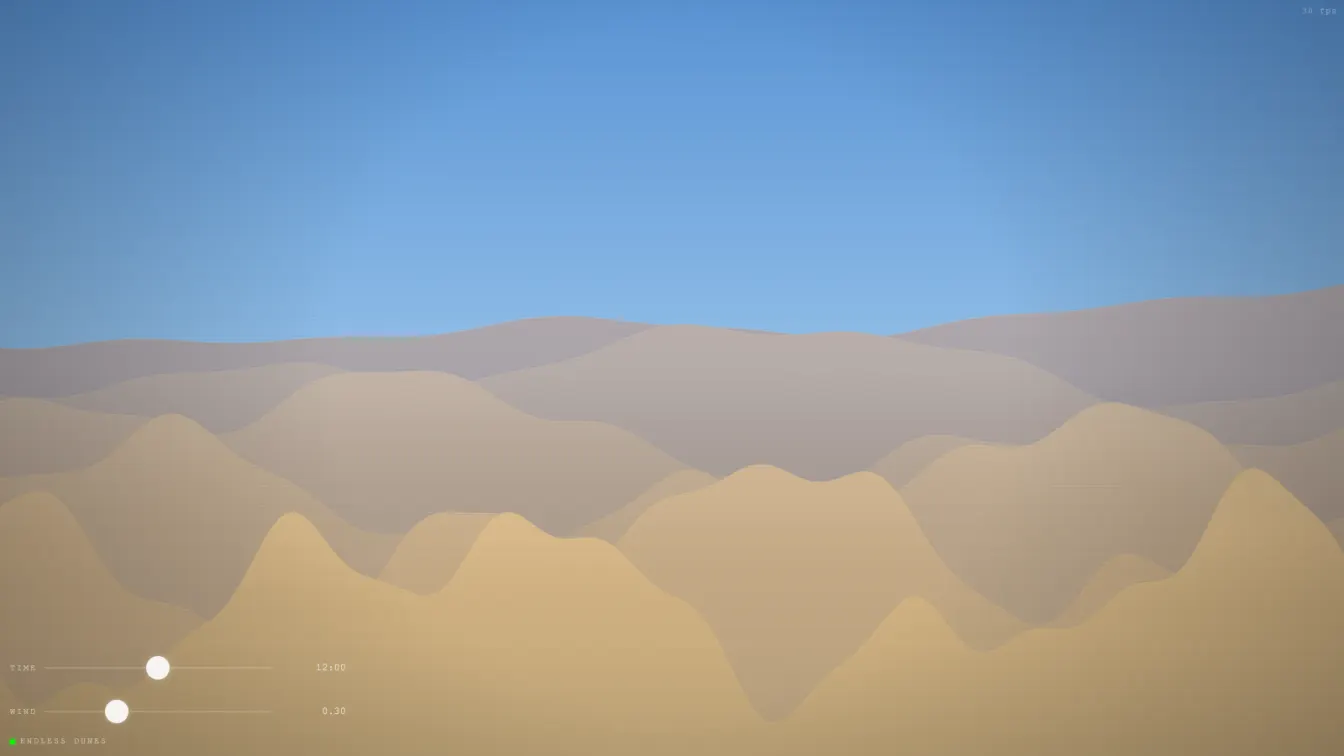
The entire scene is a single <canvas> element rendered at the user’s device pixel ratio (capped at 2×, never uncapped). There are two canvases — the main scene and an overlay for post-processing effects.
Canvas 1 (main): Sky gradient → Stars → Sun → Dune layers 0→5 →
Canvas 2 (overlay): Atmospheric haze → Vignette → Scanlines
No Three.js, no WebGL shaders, no fragment programs. Just ctx.fillRect(), ctx.lineTo(), and ctx.createLinearGradient(). The dunes are pure math.
Sine Wave Superposition
The core trick: each dune layer is the superposition of four sine waves at different frequencies, amplitudes, and phases.
function duneYAtX(x, layerIdx, scroll, wind) {
  let y = baseY;
  for (let j = 0; j < 4; j++) {
    const phase = phases[j] + scroll * freqs[j] + wind * freqs[j] * 10;
    y += Math.sin(x * freqs[j] + phase) * amps[j];
  }
  return y;
}
Six layers, each with slightly different base heights. The furthest layer (index 0) sits higher on screen (lower baseY value) and uses lower frequencies, smaller amplitudes — creating the optical illusion of distance through atmospheric perspective. The nearest layer (index 5) has higher frequencies and larger amplitudes, making the foreground feel closer and more detailed.
This is the same mathematical principle that makes ocean waves look natural: real water surfaces are composed of waves at many scales. By combining long-period swells (low frequency, high amplitude) with short-period ripples (high frequency, low amplitude), you get terrain that looks organic without any Perlin noise or fractal Brownian motion.
Wind-Driven Parallax
The wind slider doesn’t just animate the scene — it controls the scroll rate of a continuous parallax system. Each layer moves at a different speed proportional to its depth index:
parallax: 0.3 + layer * 0.15
Distant layers drift slowly; foreground layers shift quickly. Combined with the wind-driven phase offset in each sine component, this creates a convincing sense of air moving across the landscape, shifting the dune formations over time.
Dawn/Dusk Color Palette System
The time-of-day slider (00:00 through 23:59) drives a complete color palette system:
- Sky gradient: transitions from deep purple night through warm dawn oranges to full-day blues
- Sand colors: each dune layer’s color temperature shifts based on sun altitude and time of day
- Sun position and glow: calculated from the time value using
sin(tod * π * 2 - π/2) - Star visibility: stars fade in when nightness exceeds a threshold, with per-star twinkle animation
- Atmospheric haze: distant dune layers get a blue-gray overlay that’s stronger at night
The palette function computes everything from a single tod (time-of-day) input. No hardcoded color stops — everything derives from the sun’s simulated altitude.
function getPalette(tod) {
  const sunAlt = Math.sin(tod * Math.PI * 2 - Math.PI / 2) * 0.5 + 0.5;
  const dawn = Math.max(0, 1 - Math.abs(tod - 0.25) * 8);
  const dusk = Math.max(0, 1 - Math.abs(tod - 0.75) * 8);
  const warmth = Math.max(dawn, dusk);
  const night = Math.max(0, 1 - sunAlt * 2.5);
  // ...compute all colors from these factors
}
This design means the scene is continuous — no discrete states, no hard transitions. Dragging the slider from midnight to noon smoothly interpolates through every phase of a day.
Performance
Running at 48–50 FPS in headless testing. On a real device with GPU-accelerated Canvas 2D, this hits a solid 60 FPS with room to spare. The entire render loop is:
- Sky gradient fill (single
fillRect) - Stars (180
fillRectcalls, each 1–2 px — negligible) - Sun glow + disk (two
fillRect+ onearc) - Six dune fill passes (each ~
width/3≈ 320lineTocalls per layer) - Overlay effects (single
fillRectfor haze, another for vignette, then a loop for scanlines)
Total draw calls per frame: approximately 2,000. Modern Canvas 2D handles this easily.
Connections to Past Projects
This continues the theme from Liquid Glass (April 15) and Magnetosphere (April 16) — procedural generation without external assets. Where those projects pushed WebGL and Three.js to their limits, Endless Dunes proves you don’t need a GPU pipeline for compelling procedural art. Sine functions + layered rendering + a good color palette do the heavy lifting.
The design philosophy remains the same: fewer controls, all functional. Two sliders (time, wind). Everything works. Nothing is decorative for decoration’s sake.
Try It
[daily-2026-04-17-endless-dunes.vercel.app] — drag the time slider to dawn and watch the sky ignite.